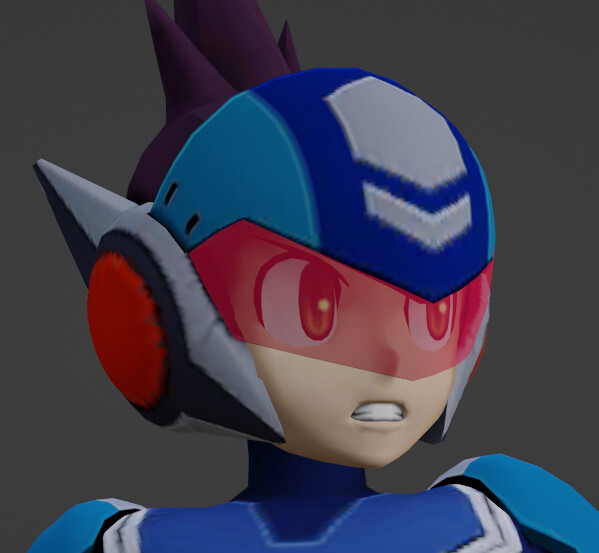
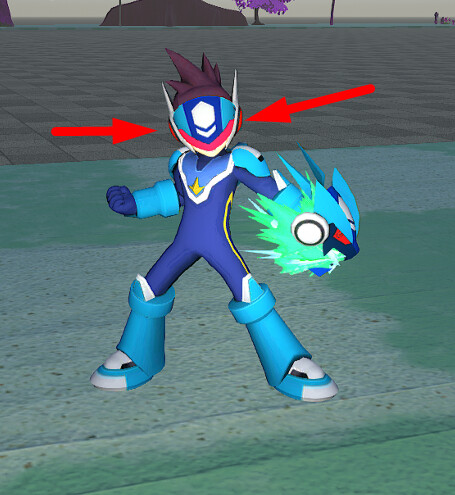
the visor should be assigned a separate material to the rest of the model.
then when you import, you should see the visors texture as its own material.
set that material to “translucent”, NOT “masked”
I am aware there is a option to set material as translucent and in all models I’ve uploaded, that option never seems to work, I’m convinced it doesn’t currently work :’(
If there is a way in setting it up on blender that might make it work in workshop editor; I really would like to know. I’ve been googling and cannot find a solution for it.
Edit: All textures always appears solid with ‘masked’ with transparency if there is any. Always invisible with ‘translucent’ toggled on.
You were right, Texture just has to be transparent. No need for other things like adjusting alpha value in the blender. I guess all of previous attempts didn’t work because textures were solid. Which is strange because I could have sworn it didn’t work on transparent textures at some point but maybe I’ve goofed in the past before I understand how to set textures up correctly. And translucent material itself needs to be separate and I know how to tweak materials currently!
WAIT A MINUTE HOLD UP. I FIGURED IT OUT! I KNOW WHY IT DIDN’T WORK BEFORE. It IS a bug. I’ll explain briefly and write a bug report very soon.
Basically: import the model that has a translucent texture material all set up correctly (semi transparent) then enable “Translucent” option and it will show up invisible. Hit “SAVE METADATA” then re-upload the same model with no changes and that one will have translucent texture show up correctly after.