Canvas URL surfaces are held back by their lack of material properties, making them all share the same attributes besides Diffuse.
By allowing Players to adjust the reflectivity or select the Physmat and Normal map, they can blend in much more naturally with proper Materials.
Here’s a quick Mockup:
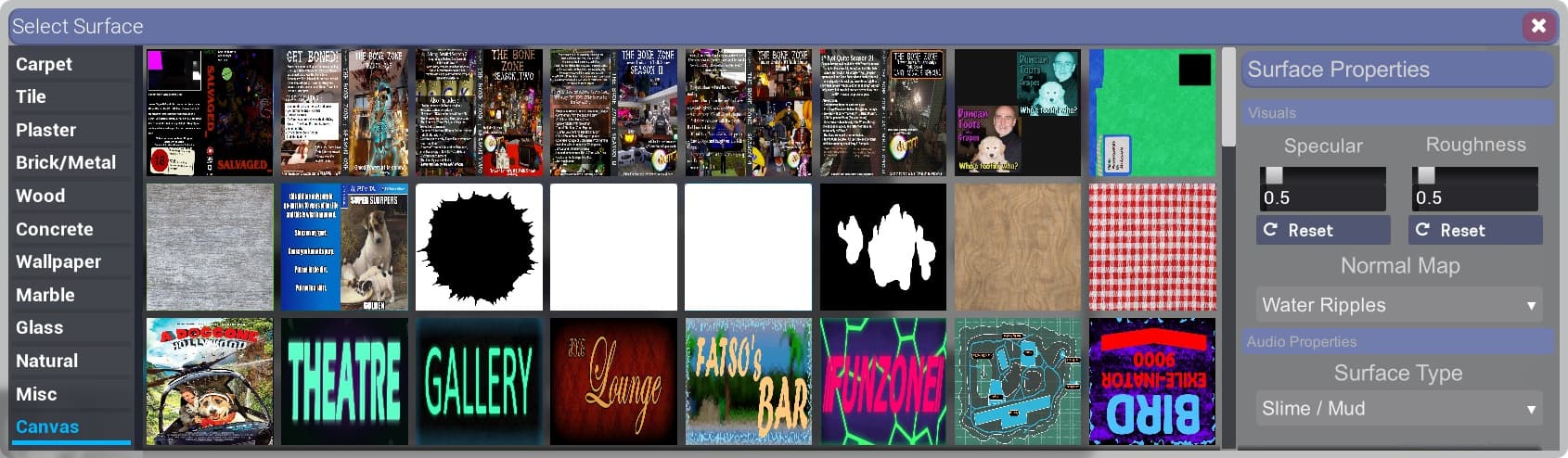
Upon inputting a URL into your Condo, it appears in the Surface selection and in the Server Overlay (Tab).
From here the Material’s properties can be adjusted in multiple ways:
- Specular and Roughness - Self explanatory sliders that affect the surface over all (like Workshop Materials)
- Normal Map - A dropdown menu containing a list of generic Normal maps (Water ripples, grass, concrete, mud, etc)
- Surface Type - Affects the Impact FX and Footstep audio. Prevents grass textures from sounding like concrete.