I joined someone’s condo last night and they had bold and italics text in the notebook item test field, I asked hot they did it and was informed that these codes (right term?) worked to change format.
(remove space after first “<”. had to write like this in forum to display correctly.
< b> BOLD </>
< i> Italics </>
There was another text format option but i didn’t get the code to use it before I had to leave.
Is there any other functional codes to format text?
How is this not documented anywhere?
5 Likes
This was documented in the patch notes it was added in, but we never got around to documenting it ingame.
I believe the other ones are < u> underline, < h > highlight, < h1 >header
4 Likes
This could very much use a write-up on the guides, in my opinion - I had no idea this was implemented either, and love it!
1 Like
Oh, I remember someone telling me about this too and I totally forgot. Thanks for mentioning it again!
I figured out <h2> also works as a header 2, similar to h1, but without the drop shadow.
I’ve also noticed trying to stack tags doesn’t work, ie. you can’t have bold and underlined text with one or two ending tags.
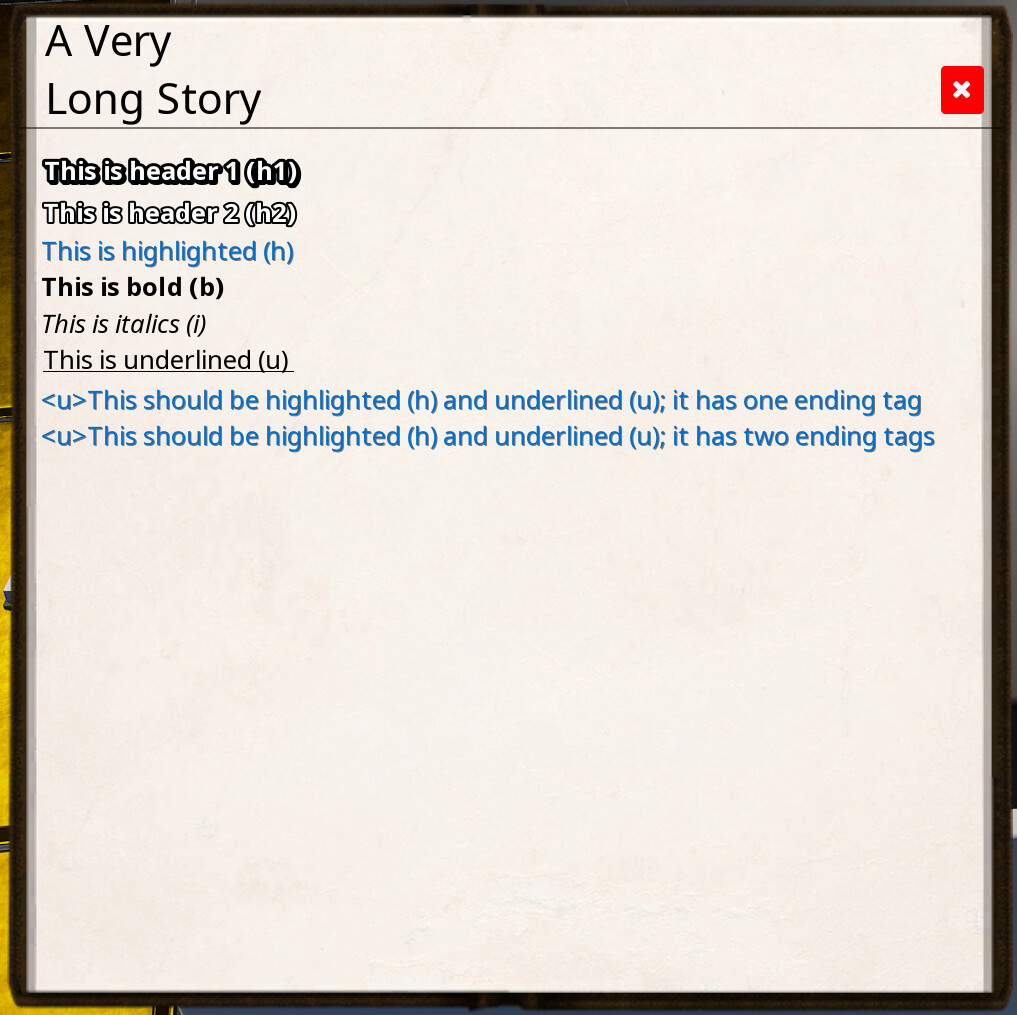
For anyone that finds this post, here’s examples of what it looks like; it seems to work with notebooks, readable books, and the necronomicon. This is the exact code I’ve used in the book, for demonstration.
<h1>This is header 1 (h1)</>
<h2>This is header 2 (h2)</>
<h>This is highlighted (h)</>
<b>This is bold (b)</>
<i>This is italics (i)</>
<u>This is underlined (u)</>
<h><u>This should be highlighted (h) and underlined (u); it has one ending tag</>
<h><u>This should be highlighted (h) and underlined (u); it has two ending tags</></>
5 Likes