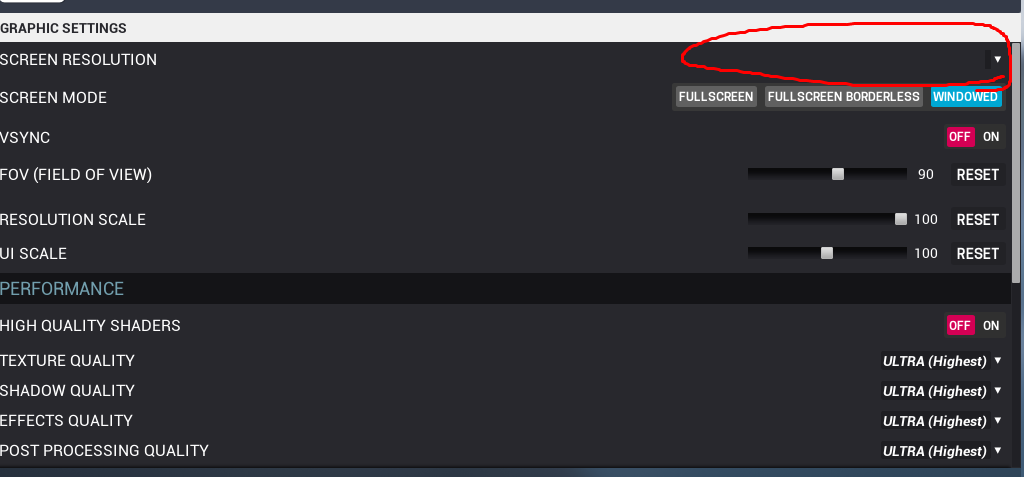
As you can see, i cannot change the screen resolution and everytime i change something like Shadow Quality or Texture Quality it resets to Ultra, its almost impossible to play this way. Help me 
2 Likes
I haven’t touched the Screen Resolution, but I can confirm that Texture Quality, Shadow Quality, Effects Quality, and Post Processing Quality don’t save properly. Mine are stuck on Low.
I had a similar issue. I was able to change the ScreenMode to a different one and it forced the resolution to save.
Just looked into this. If you change the setting and do NOT hit the apply button, it’ll stick. When you hit the apply button it’ll reset them all back to ultra. I’m currently looking into the bug (it’s a bug related to 4.14).
2 Likes
And what about the screen resolution? Nothing appears to me, should i try reinstalling?
I’m not sure what the cause of that is, I’m not able to reproduce it. I would try verifying your game cache in Steam.
I did that, and there was nothing missing. Im reinstalling, going to see if it fix that. Thanks for the help with the graphics 
Well other than the resolution issue, I was able to fix the settings issue for the next patch. I’ll look into the resolution stuff more.
This topic was automatically closed after 2 days. New replies are no longer allowed.