On canvas items, the scale lock state does not save if I close and open the gizmo menu, if I have an aspect ratio that is not all set to 1 (width, height, depth), despite all scale values being 1:1.
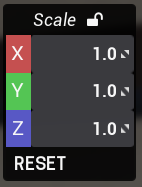
by scale lock I mean the gizmo lock button that keeps scale values equal
Steps to Reproduce
- Place canvas
- Edit canvas and set the height aspect ratio to 0.5
- Open the gizmo menu for that canvas
- Lock the scale values
- Close and re-open gizmo
- the scale lock will be unlocked
What I expected to happen
Typically, if the scale values all match, the state of the scale lock saves. So if I have an item at 1.0 scale for xyz, and I lock the scale, this will stay locked even if I close the menu. This allows for quickly adjusting the size without having to click lock every single time.
If scale values are not all equal, then the lock state doesn’t save. This mostly makes sense because if the values aren’t all equal, its not really in a “locked” state anyways, because the entire point of scale lock is to keep all 3 values equal.
What happened
If width, height and depth (under Edit) aren’t set to 1 then the scale lock state no longer saves even if all 3 scale values are equal.